
When you first start learning about storage, the terminology gets confusing because RAID 0 vs RAID 1. But, they’re simple to understand when someone just tells you about them in simple terms.
In this guide, I’ll break it all down in a simple and friendly manner so even beginners will easily understand what sort of RAID they might want.
What is RAID 0?
RAID 0 is a technique in which two or more hard disks work together to increase I/O performance. Think of it as breaking a large job into two smaller jobs and letting both drives work part of the task at the same time. As the workload is shared between both drives, this means that data can be read and written more quickly than your computer would otherwise be able to.

But here is the catch: RAID 0 does not give you any kind of data protection.
If just one drive dies, however, you lose everything across the whole RAID 0 configuration. This is because of half of the data residing on one drive and the remaining being on the other.
What is RAID 1?
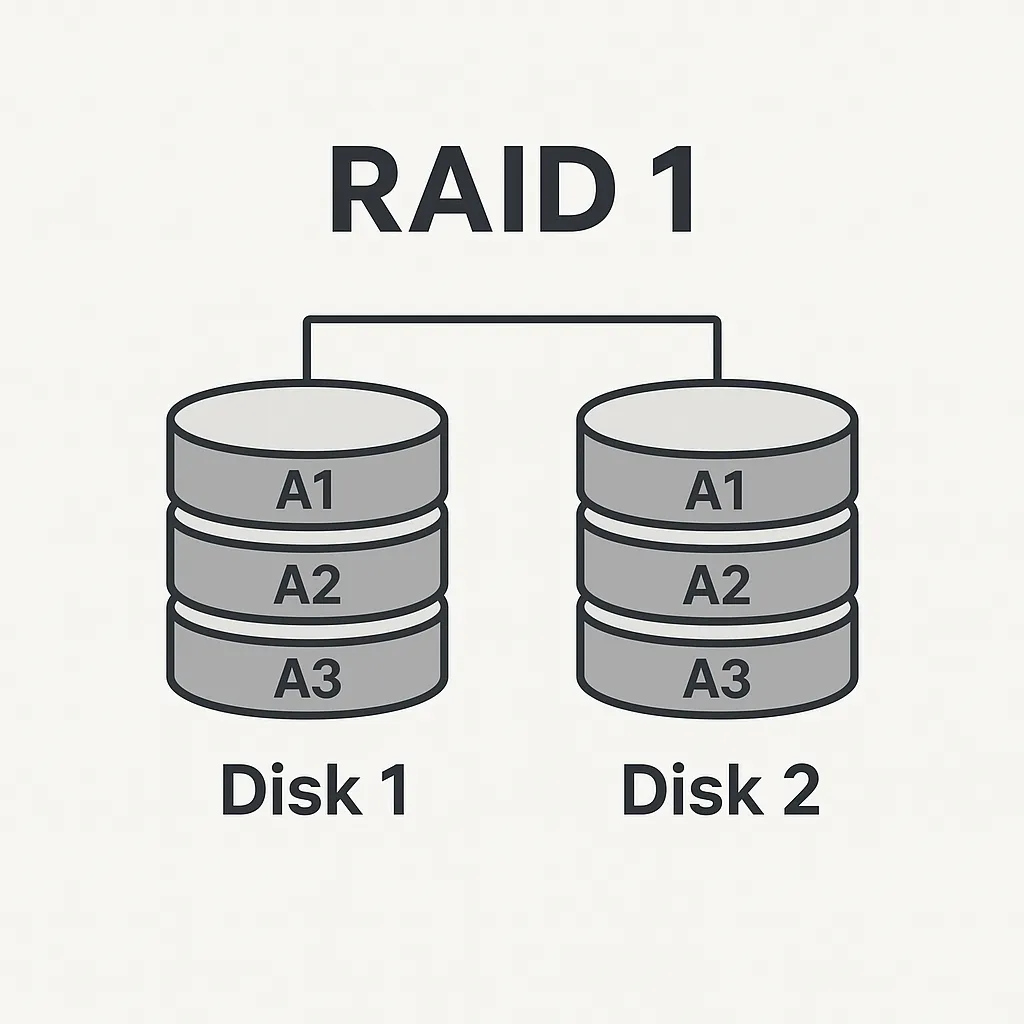
RAID 1 is all about safety. In this setup, you have two drives, but instead of splitting data, both drives store the same information. It’s like a photocopy of every file.
If one of those drives fails, your computer functions as usual because the second drive still contains a full copy of your data. This way, RAID 1 is one of the most straightforward and secure RAID levels.
The trade-off?
You don’t get extra speed, and you lose half your usable storage. For example, two 1TB drives in RAID 1 give you only 1TB of usable space because the other 1TB is used for the copy.
Key Differences Table: RAID 0 vs RAID 1
| Feature | RAID 0 | RAID 1 |
| Main Purpose | Speed | Data Protection |
| Data Safety | No safety, high risk | Very safe |
| Performance | Faster read/write | Usually similar to a single drive |
| Usable Storage | Total of all drives combined | Only half of the total |
| Best For | Gaming, editing, temporary data | Important files, servers, backups |
| Drive Failure Impact | Lose all data | No data loss |
Speed Comparison
If you’re after speed, RAID 0 all the way!
Since RAID 0 slices the data and splits it between drives, both disks can work together — which means that, for example, games load faster; you can edit large videos more smoothly; and those big files copy faster.
RAID 1 doesn’t speed up much.
Some see a little faster reading because the computer can read data from either drive, but that’s marginal and not what RAID 1 was designed to do.
In short:
- RAID 0 = Speed boost
- RAID 1 = Safety first
Data Safety & Reliability Comparison
This is where RAID 1 shines.
In RAID1, the same file exists on both drives. Those two drives then mirror each other, so if one fails or gets corrupted, your data is sitting pretty on the second drive. This is majorly helpful for documents, photos, videos and also companies that cannot afford downtime.
RAID 0 offers zero protection.
Even a minor drive issue can make everything unreadable. This is why RAID 0 should never be used for important or irreplaceable data.
A simple example:
- RAID 1 = You keep two copies of your passport.
- RAID 0 = You tear your passport into two pieces and keep each piece in a different drawer.
If you lose one drawer, you no longer have a complete passport.
Who Should Use RAID 0?
RAID 0 is a good option when you want fast performance and you don’t mind taking a risk with data loss. It works well for:
- Gamers who want faster loading times
- Video editors who work with large files
- People who store temporary or non-important data
- Tasks where speed matters more than safety
If the drive fails, you simply reinstall everything, so it’s suitable only when your data isn’t critical.
Who Should Use RAID 1?
RAID 1 is ideal for anyone who values data safety more than speed. It’s great for:
- Small businesses that cannot afford data loss
- Home users storing family photos, documents, or recordings
- Students working on long-term projects
- Systems that must stay online (like small servers)
- Content creators who want peace of mind
If a drive fails, you simply replace it, and your system continues running normally. It’s a “no-stress” storage solution.
Pros & Cons of RAID 0
Pros
RAID 0 gives you a noticeable speed boost. Your computer feels snappier, applications load faster, and file transfers are quicker. You also get to use the full storage space of both drives combined, which is great for storing large files.
Cons
The downside is the risk. Since the data is split between both drives, losing even one drive means losing everything. RAID 0 offers no protection, so you must be comfortable with that risk or maintain separate backups.
Pros & Cons of RAID 1
Pros
RAID 1 gives you excellent data safety. Your files exist on two drives, so even if one fails, your system keeps working. This is ideal for long-term security and peace of mind. It’s also easy to set up and doesn’t require advanced knowledge.
Cons
You lose half your storage because everything is duplicated. RAID 1 also doesn’t provide the same speed boost as RAID 0. So, if performance is your highest priority, this setup may feel limiting.
Which One Should You Choose?
Which one you pick (RAID 0 or RAID 1) really depends on whether speed or safety is more important to you.
If you need high performance for gaming or editing and don’t care about your data, RAID 0 is an excellent choice. But if you value reliability above all else and would like your files to remain safe in the event of a drive failure, RAID 1 is the way to go.
For the vast majority of home users, RAID 1 provides a greater peace-of-mind for as long as you’re using it.
For people who care about speed, RAID 0 is fast but risky.
Also Read: VirtualBox vs VMware Workstation: Detailed Comparison for Beginners
Frequently Asked Question (FAQ)
Is RAID 0 faster than RAID 1?
Yes. RAID 0 is much faster because it splits data between drives. RAID 1 focuses on safety, so speed is similar to a single drive.
Does RAID 1 protect my data if a drive fails?
Yes. RAID 1 keeps a full copy of your data on both drives, so your files remain safe even if one drive stops working.
Do I get full storage capacity in RAID 0?
Yes. RAID 0 combines both drives, so two 1TB drives give you 2TB of usable space.
Can I recover data if RAID 0 fails?
Usually no. Since data is split between drives, losing even one drive can make everything unreadable.
Which is better for beginners: RAID 1 or RAID 0?
RAID 1 is safer and beginner-friendly because it protects your data. RAID 0 is better only if you want speed and don’t mind the risk.