
If your MacBook battery doesn’t give enough backup like before, you’re not alone. After months or years of use, many users find that battery life shortens, and they wonder if something is wrong.
Apple has made it very simple to check MacBook battery health. Below I’ll take you through that all, step by step, so you can know the condition of your battery and what to do about it.
What Is MacBook Battery Health?
Before we check anything, let’s understand what battery health actually means.
Your MacBook makes use of a lithium-ion battery. With time, this battery does wear down. Every time you charge and discharge it, a bit of its capacity degrades. This is completely normal.
Battery health shows:
- How much capacity your battery still has
- Whether it’s working normally
- If it needs service or replacement
Checking your MacBook’s battery health helps prevent sudden shutdowns.
How to Check MacBook Battery Health
Apple provides a built-in way to check battery health. You don’t need to install anything.
Step 1: Click the Apple Menu
- Click the Apple logo in the top-left corner of your screen
- Select System Settings (or System Preferences on older macOS)

Step 2: Go to Battery Settings
- In System Settings, click Battery
- Then click Battery Health or Health Information

This option may appear slightly different depending on your macOS version.
Step 3: Check Battery Condition
You’ll see two important things:
Battery Condition
This usually shows one of these statuses:
- Normal – Your battery is healthy
- Service Recommended – The battery is worn and may need replacement
Maximum Capacity
This shows the percentage of battery capacity compared to when it was new.
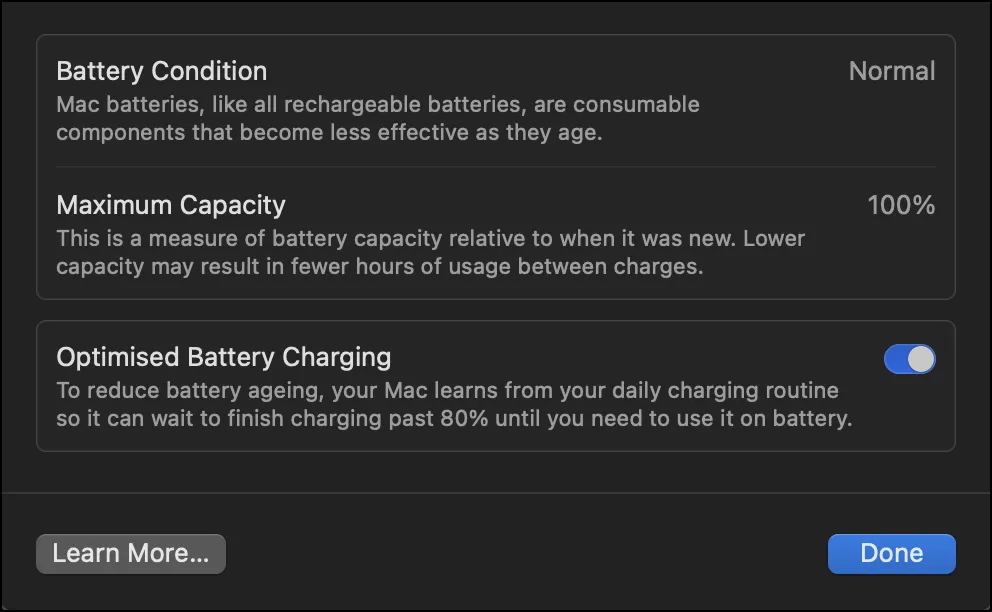
For example:
- 100% = Like new
- 85% = Slightly worn, still usable
- Below 80% = Battery performance noticeably reduced
This is the easiest way to check MacBook’s battery health.
Apple also explains this process in its official support document, which you can read here:
https://support.apple.com/en-in/102888
How to Check Battery Cycle Count on MacBook
Another useful detail is the battery cycle count.
A cycle means:
- Using 100% of battery power (not necessarily in one go)
Steps to Find Cycle Count
- Click the Apple menu
- Select About This Mac
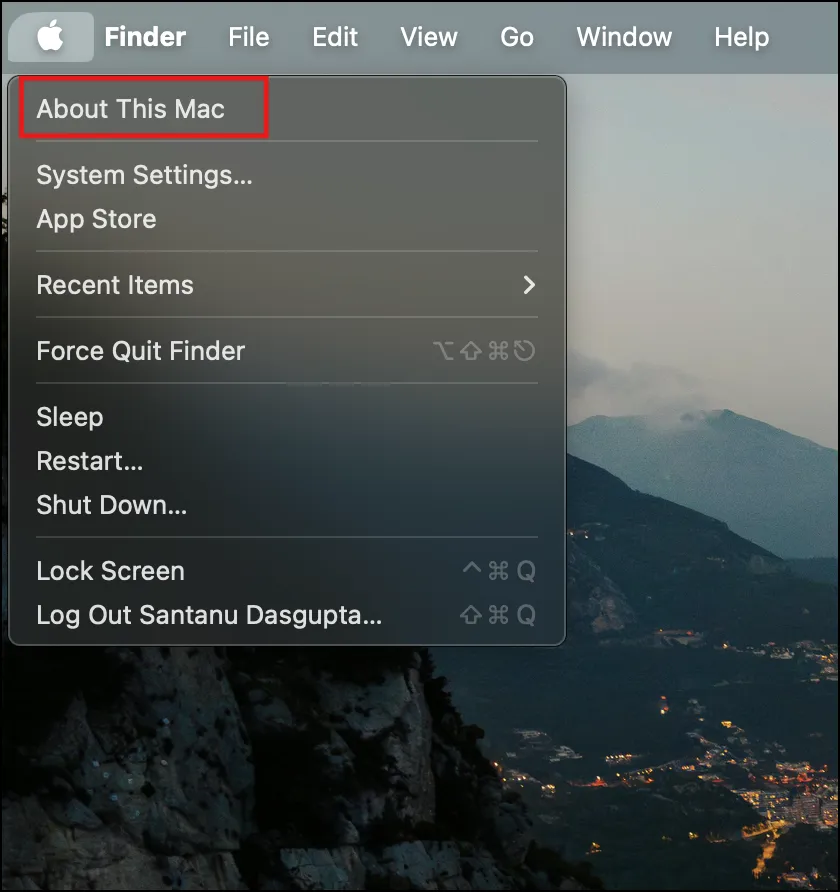
- Click System Report

- Go to Power
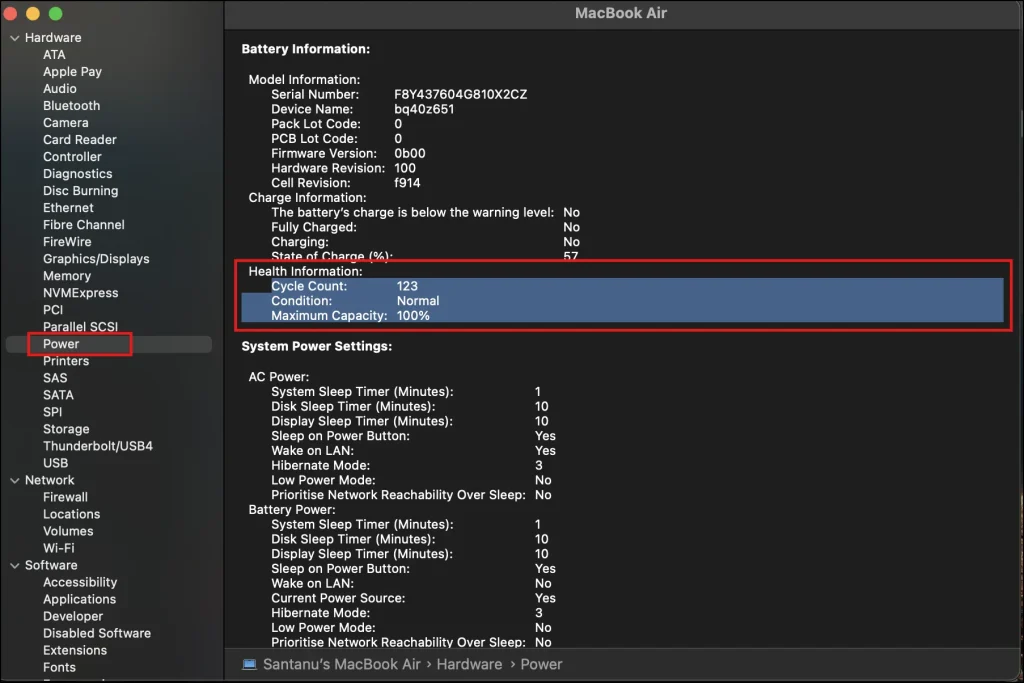
Here you’ll find:
- Cycle Count
- Battery Condition
- Maximum Capacity
Most MacBook batteries are designed to last 1000 cycles before performance drops significantly.
What Is a Good Battery Health Percentage?
A lot of people wonder about this, so here’s a simple explanation.
- 90–100%: Excellent
- 80–89%: Good, normal usage
- 70–79%: Battery aging, reduced backup
- Below 70%: Battery replacement recommended
If your MacBook is more than 2–3 years old, a slight drop is completely normal.
Tips to Maintain Good MacBook Battery Health
You don’t need to be a tech expert to keep your battery healthy. Simple habits help a lot.
Useful Tips:
- Avoid keeping your MacBook at 0% or 100% for long periods
- Don’t expose it to extreme heat
- Use original or certified chargers
- Keep macOS updated
- Enable Optimized Battery Charging
Small changes can extend your battery life by months or even years.
Final Thoughts
It’s easy to check MacBook battery health and won’t take much of your time. No technical knowledge or special tool is required — just a few clicks to see how your battery is doing.
But by taking a bit of care over your battery and following some basic tips, you can ensure that the battery in your MacBook lasts longer and avoids any sudden problems. Your MacBook will be in a better state for longer if you check it regularly.
Also Read: How to Easily Check Your Laptop Battery Health for Better Performance
Frequently Asked Question (FAQ)
How often should I check MacBook battery health?
Once every 2–3 months is enough for regular users.
Does charging overnight damage battery health?
Not significantly. macOS manages charging to reduce long-term damage.
Can battery health improve over time?
No. Battery health only decreases with usage.
Is low battery health dangerous?
Not dangerous, but it can cause shutdowns and poor performance.
Can I use my MacBook while charging?
Yes, it’s completely safe and normal.