
Checking your laptop’s battery health is essential to ensure it continues to work as it should over a long period of time. With continuous usage, the ability of your battery to hold a certain charge decreases and knowing how to monitor its health will help you decide when it’s time for a replacement. In this guide, we’ll show you a quick and easy way to check your laptop battery health using Windows’ built-in tools.
Reasons for checking laptop battery condition/hygiene
Laptop batteries lose their capacity to hold a charge as they age, leading to shorter usage times between charges. Regularly checking the health of your battery ensures that you’re aware of its current condition and helps you take necessary steps to replace it before it affects your productivity.
Step-by-Step Guide to Check Your Laptop Battery Health
1. Open Command Prompt as Administrator
To get started, you’ll need to access the Command Prompt. You can do this by typing “cmd” in the Windows search bar and right-clicking on the Command Prompt app and Choose “Run as administrator” from the menu.
check your laptop battery health

2. Generate the Battery Health Report
After starting the Command Prompt Window, the next step is to enter the following command:
powercfg /batteryreport
Then, press Enter.
3. Locate the Battery Report
In case the command runs without any error, you will be greeted with a correspondence in the Command Prompt verifying that the battery life report has been compiled and subsequently saved in some destination on your system. In most cases, it is advisable to follow the path in most cases:
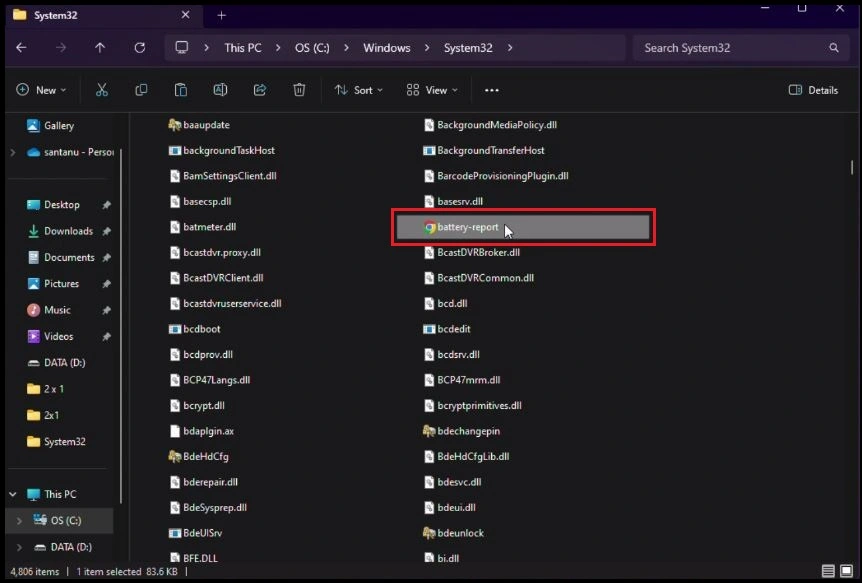
C:\Windows\system32\battery-report.html

4. Locate the Report File
In the next step, you have to look for the actual path in which the battery report was kept. For this, you may open the File Explorer and go to the manually specified path. Or even better, you can just copy and paste the path in that location on the address bar in the File Explorer for efficiency.
Want to Follow the Complete Tutorial on YouTube
If you’re finding the steps tricky or need a visual guide to help you through the process, I’ve got you. Watch my youtube video where I go over each step with instructions. Watch it here:
5. Open the Battery Report in a Web Browser
Since the battery report is saved as an HTML file, you can open it in any web browser. Simply double-click the battery-report.html file, and it will open in your default browser.
check your laptop battery health
An Insight into the Battery Report
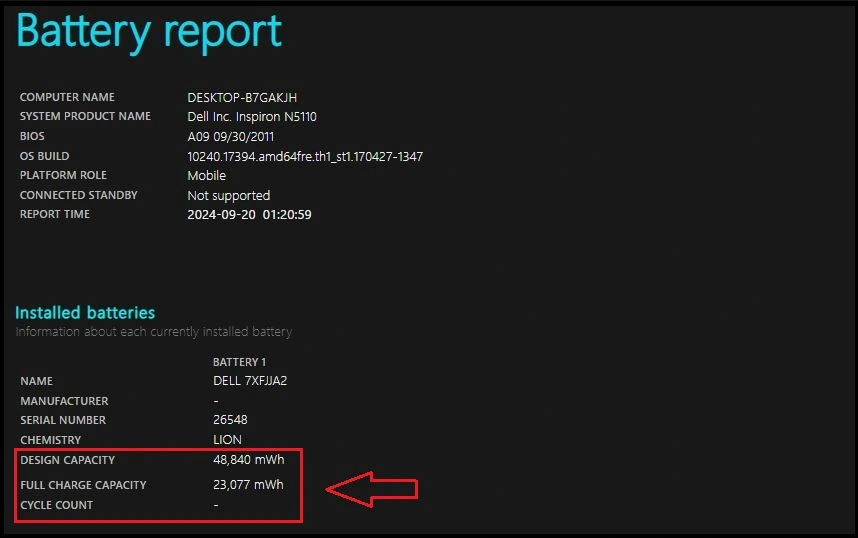
After viewing the battery report you opened, you will get some diagnostic information on the battery of your laptop such as:
- Design Capacity:This is the value of the maximum charge the power storage system was rated to achieve when it was new.
- Full Charge Capacity: This shows the amount of charge the battery can currently hold.
- Cycle Count: This refers to the total number of complete charge and discharge cycles which the power storage device has experienced.
In looking for a laptop battery health status, it helps to closely monitor the Full Charge Capacity. This number decreases over some time; hence battery life is expected to decrease as well. If the current full charge capacity is much lower than the design capacity, then it is clear that your battery is on the verge of wearing out and it would be best you retire that battery otherwise you will run into performance issues.
For a step-by-step visual guide, check out this YouTube video where I demonstrate how to generate and analyze a battery report.
How to Evaluate the Outcomes
The Design Capacity depicts the initial potential possessed of a new battery. As time goes, that is expectably, going to decrease. However, if you notice a substantial difference between the two, your laptop’s battery might not last as long on a single charge, signaling that it’s time for a replacement. This document clarifies the current condition of the battery and assists in determining whether a battery is to be replaced or not.
Final Thoughts
It is important to check your laptop battery’s health periodically as this is one way of making sure that you are getting the best out of your laptop. Knowing the time to change your battery can help you avoid unplanned disruptions and therefore increase your productivity. So, take a few minutes to check your battery health today—it’s quick and easy, and it could help you avoid future headaches!
You can participate in the comments by sharing your stories or posing questions. If you found the given manual interesting, do not hesitate to distribute it to other people who might be interested in it!
FAQ:
How do I check my laptop battery health?
You can check your battery health by using the Command Prompt with the command powercfg /batteryreport.
What information does the battery report provide?
It shows details like design capacity, full charge capacity, cycle count, and estimated battery life.
How often should I check my battery health?
It’s a good idea to check your battery health every few months, especially if you notice reduced performance.
What does design capacity mean?
Design capacity is the original maximum charge the battery could hold when it was new.
What does full charge capacity indicate?
Full charge capacity shows the amount of charge your battery can currently hold.
What does a low full charge capacity mean?
A low full charge capacity indicates that your battery is aging and may need replacement.
How can I improve my laptop’s battery life?
You can improve battery life by adjusting power settings, closing unused applications, and keeping your battery charged between 20% and 80%.
Is it safe to use my laptop while charging?
Yes, it is generally safe to use your laptop while charging, but avoid letting it overheat.
When should I replace my laptop battery?
Consider replacing your battery if the full charge capacity is significantly lower than the design capacity or if it won’t hold a charge.
Can I view the battery report on any browser?
Yes, the battery report is saved as an HTML file and can be viewed in any web browser.